


First of all, please take a look on our responses to the frequently asked questions on our FAQ page.
General Information
On the event broadcast page, you will find links through which you can watch the broadcasts. Links are split into two main blocks:
- Streams directly viewable in browser - in order to watch the stream you can use any browser that supports Adobe Flash.
- Streams viewable using external software - in order to open these streams you have to install an additional freeware (download links are displayed below).
|
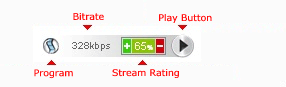
 – By clicking on this icon, you will watch the stream directly using the external software. The software has to be installed in order to watch the stream.
Software
We suggest you to install first of all SopCast since it is currently the most used software.
| |||||||||||||||||||||||||


Traffic Question
You can watch all streams on our website free of charge. However, if you have to pay separately for traffic, additional fees may be charged by your internet service provider. You can calculate the approximate traffic consumption as follow:
Megabytes_per_hour = Bitrate / 8 * 60 * 60 / 1024
or easier:
Megabytes_per_hour = Bitrate / 2.28
where the bitrate is given in kilobits per second.
Please note that this is only the incoming traffic calculation. The outgoing traffic can vary from one stream to another.


